
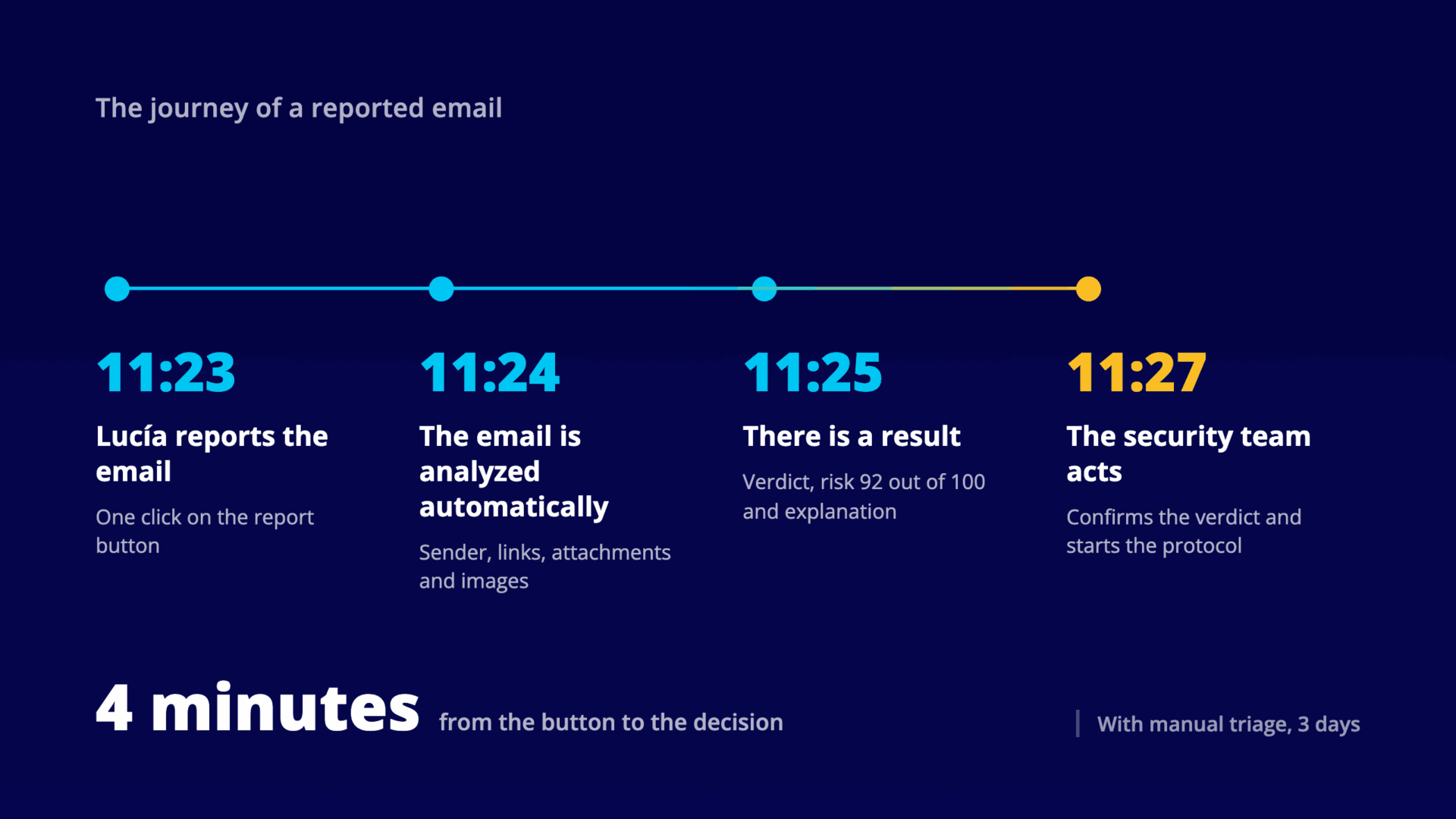
Wednesday, 11:23. Lucía receives an email that looks like it comes from IT, asking her to renew her VPN credentials before noon. Something feels off. She presses the report button and goes back to what she was doing.
That is all she does. The previous piece in this series left open the point that the reporting habit only holds if reporting has a consequence the person can perceive, and that this consequence depends on how long a real email takes to get an answer. Automated phishing email triage is what compresses that wait, and here is its journey step by step, without jargon. The times and the numbers belong to one specific organization, the same one as the previous pieces, and are not industry averages.
What is the first thing checked when a reported email comes in?
The first thing is whether your own program sent it. That is the only question the platform can answer without investigating anything, because it holds the record of every phishing simulation it sent, which is why it goes first.
When the answer is yes, the case closes on the spot. The platform credits the person for spotting it, adds it to their score, and there is nothing left to analyze. Lucía’s email is not a simulation, so the journey continues.
What does the analysis of a reported email check?
11:24. From here the email is analyzed automatically, with the same level of detail someone from the security team would apply, but without anyone having to open it.
It checks whether the email really comes from where it claims to, or whether someone is impersonating a known company. It follows each link to its final destination, because a link can display one address and lead to another. It examines the attachments, including the classic one that pretends to be an invoice and is not.
And it looks at the images in the message. That is where a good part of what email security cannot see is hiding today. A QR code takes the place of the link and a screenshot takes the place of the text, so an analysis that only reads the text walks straight past both cases.
An analysis that only reads the text of an email cannot see the attack that arrives inside an image.
How to simulate that attack to train your people is already covered in the article on quishing on this blog. Here the QR code arrives in an email somebody has already reported, and what has to be done with it is decide what it is.
And when the technical evidence is not enough?
Some emails are not settled by the evidence. The sender is legitimate, the links are on no list, there are no attachments, but the message asks for something that does not fit, with an urgency that does not fit either. This is the grey area where the judgment of a person used to be required.
For those cases there is an artificial intelligence agent that analyzes what the email says and how it says it, from the urgency and the pressure to the pretext it uses to justify the request. It does not replace the technical check. It steps in when that check falls short, which is exactly where the difficult reports used to pile up.
In Lucía’s email the evidence is more than enough. The sender’s domain was registered 48 hours ago, the links point to a server in a country where the company does not operate, and sender authentication fails.
Verdict: phishing. Risk score: 92 out of 100.
What does the security team receive when the analysis is done?
11:25. What reaches the security team is a result instead of an email to open. It is three things.
- A verdict. Real phishing or false alarm.
- A risk score from 0 to 100. The priority, without having to read anything else.
- An explanation of why, written in the language of whoever is reading it.
The third one is what changes who can work with the report. The explanation does not arrive in the language of an email header, it arrives in sentences such as «the attachment hides its real file type» or «replies to this email would go to an address other than the sender’s». You do not need to know how to read an email from the inside to understand them, and that means the report stops waiting for the one person on the team who does.
What happens to reported emails that turn out to be harmless?
Lucía’s email was phishing, but most are not. In the month we have been talking about, 160 of the 183 reported emails turned out to be harmless. A real invoice that looked odd, a promotion, an email from a new supplier nobody had on their calendar.
That is what happens when people pay attention. An organization that treats the false alarm as a cost ends up teaching its people not to report. The person who hesitated over a legitimate email did exactly what was asked of them.
What changes with automated analysis is that those 160 emails also get their verdict and close without costing anyone’s time. They stop being the pile underneath which the 23 that really were attacks are waiting.
How long does the complete journey take?
11:27. Whoever is on duty opens the report, finds the analysis already done, confirms the verdict and starts the response protocol. The decision is still theirs. What changed is that they no longer have to build the evidence in order to make it.
And the protocol does not have to wait for that confirmation. A Playbook is a set of actions that run on their own when a given event occurs, so the verdict can chain the first ones without anybody launching them.
It can be an alert to the team by email, by Slack or by Microsoft Teams, plus a call to whatever systems you have integrated, so containment starts while the person on duty reviews the case. Where to draw that line is each organization’s call, because some responses are better off starting on their own and others should not move until somebody looks.
Between the moment Lucía pressed the button and the moment the security team started acting, four minutes passed. With the queue of 47 reports we described in the first piece of the series, it would have been three days.
That difference carries a cost the queue does not show. A phishing email waiting three days to be classified stays three days in everybody else’s inbox, and nobody can warn, block or contain an attack that has not been looked at yet. Classification time is the time the attack has to keep working.
What Lucía notices, without anyone explaining it to her
There is a second reading of those four minutes, and it is on no security dashboard. Lucía spoke up and something happened.
The verdict and the score will never reach her screen, and she does not need them. It is enough for her to sense that her warning entered a circuit that moved, because that is what will weigh the next time she hesitates over an email. When the journey is measured in days, the answer arrives late for her and late for the organization. When it is measured in minutes, the circuit closes on its own.
That journey is what Smart Triage runs inside the reporting console of SMARTFENSE, over the emails your people report with the button. If you want to see it on your own reports, the console holds the detail of every analysis and the history of what was classified.
In the next piece of the series we are going to shift the point of view again, and look at the month of the SOC analyst who opened those 183 reports one by one and at the hours automated triage gives back.

Leave a Reply